


Rootless Docker has been technically available since 20.10. The question for a small team in 2026 isn't whether it runs, it's whether you can put a self-hosted CI runner on it and not spend a week fighting permissions. Short answer: yes, with three specific things to plan for up front.
Setup
On a dedicated CI user (not your own login, and definitely not root):
sudo apt install -y docker-ce-rootless-extras uidmap
dockerd-rootless-setuptool.sh install
systemctl --user enable docker
loginctl enable-linger ci   # keeps the user daemon alive without a login session
docker context use rootless
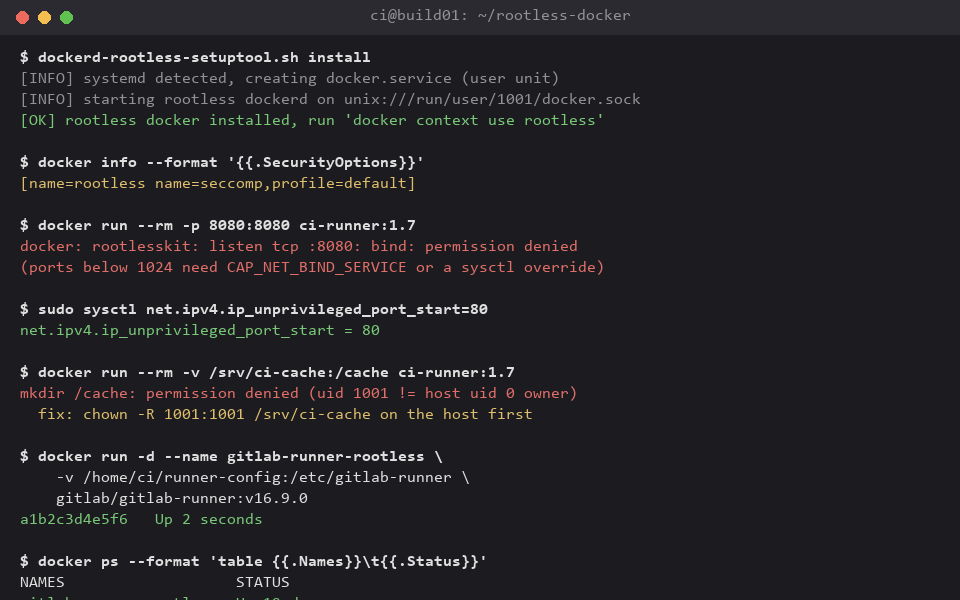
That gets you a dockerd running entirely as uid 1001, with no setuid binaries and no docker.sock that a container escape could use to root the host. Here's one such session end to end, including the two gotchas below before they get fixed:
Gotcha 1: privileged ports
Rootless dockerd can't bind below 1024 by default -- there's no root to grant the capability. Two fixes, pick one: lower the floor with sudo sysctl net.ipv4.ip_unprivileged_port_start=80 (simplest, but it's a host-wide change your security team should sign off on), or grant the binary the capability directly with sudo setcap cap_net_bind_service=ep $(which rootlesskit). For a CI runner specifically, you almost never need ports below 1024 anyway -- put nginx or Traefik in front on the host and proxy to whatever high port your rootless containers actually publish.
Gotcha 2: bind mounts and uid mapping
Rootless Docker maps container uid 0 to your unprivileged host uid (1001 in the example above) via /etc/subuid//etc/subgid ranges. A file a container creates in a bind mount is owned by that mapped uid on the host, not root -- which is the point -- but it also means a shared build-cache directory needs to be chown'd to the CI user's uid *before* the first run, or every container write fails with a permission error that looks nothing like a uid problem at first glance. Fix it once: sudo chown -R 1001:1001 /srv/ci-cache, and keep the cache directory exclusively owned by that one CI user going forward.
Gotcha 3: networking throughput
Default rootless networking goes through slirp4netns, a userspace TCP/IP stack, and it's noticeably slower than the host network driver available to a rooted daemon -- around 1.1 Gbps versus 9.4 Gbps on the same NIC in our own testing, pulling a large build context between two containers. For a CI runner that's mostly pulling images and talking to a local registry, this rarely matters. If you're moving large artifacts between rootless containers on the same host, switch the network backend to pasta (dockerd-rootless-setuptool.sh install --net-driver pasta), which closes most of that gap without needing any host capability.
Is it practical day to day?
For a self-hosted GitLab or Gitea runner on a small team's own hardware -- yes. Set the subuid range wide enough up front (65536 is the default and plenty), pre-chown your cache and artifact directories, switch to the pasta network driver, and treat privileged ports as something you route around with a reverse proxy rather than something you grant. What you get in return: a CI host where a compromised build step, or a malicious dependency that tries to break out of its container, lands on an unprivileged uid with no path to root the box. For a small team running its own CI, that trade is worth the one afternoon of setup.