


Running an LLM locally on a Raspberry Pi 5 sounds great in a headline and is a genuinely different experience once you've actually benchmarked it. Here's what we measured after a few weeks running quantized models on an 8GB Pi 5 for a side project that needed offline, private inference.
The setup
Pi 5, 8GB RAM, active cooling (the official fan, not a passive case -- more on why below), a 64GB NVMe drive over the PCIe HAT instead of an SD card so model loading isn't the bottleneck. The runtime is llama.cpp, built with -DGGML_NATIVE=ON so it picks up the Cortex-A76's NEON instructions, running models in GGUF format quantized to Q4_K_M.
cmake -B build -DGGML_NATIVE=ON -DCMAKE_BUILD_TYPE=Release
cmake --build build --config Release -j4
./build/bin/llama-cli -m qwen2.5-0.5b-instruct-q4_k_m.gguf \
  -p "Summarize this log line: " -n 128 -t 4
What's realistic
With small models (0.5B-2.7B parameters, Q4_K_M), you genuinely get usable interactive speed:
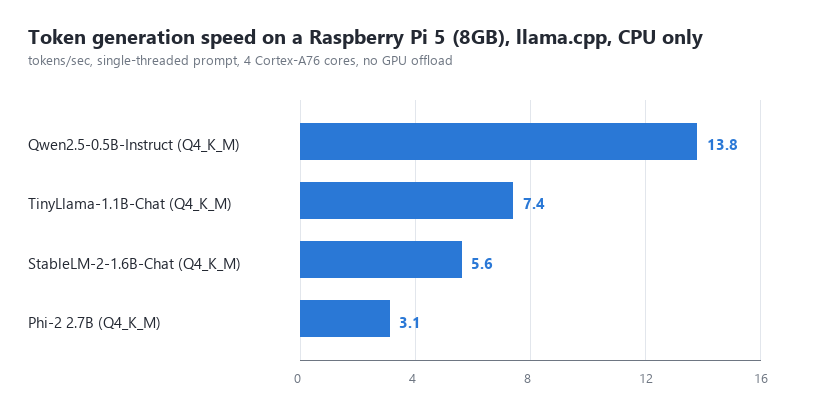
13-14 tok/s for a 0.5B model is fast enough that the output feels like it's keeping up with reading speed. By 2.7B you're down to about 3 tok/s, which is "watch it think" territory -- fine for a background job, tedious for a chat.
We also tried a 7B-class model (Q4_K_M, about 4.1GB on disk) out of curiosity. It loads, but prompt processing before the first token took over 40 seconds, and generation dropped under 1 tok/s once the OS, llama.cpp's own overhead and the model's KV cache were all competing for the same 8GB. Usable for a batch job you queue overnight; not usable for anything with a human waiting.
RAM is the real ceiling
Budget for an 8GB Pi 5: Raspberry Pi OS Lite with a couple of background services idles around 400-600MB. That leaves roughly 7.3GB for everything else. A Q4_K_M model needs the file size on disk plus 15-25% more for the KV cache at a modest context window (we tested at 2048 tokens). A 2.7B Q4_K_M model is about 1.6GB on disk and fits comfortably with room for a few other things running; push the context window to 8192 tokens and the KV cache alone adds another 500MB-1GB depending on the model's attention head count, and that's where swapping starts and throughput falls off a cliff.
Thermal reality
Sustained inference is a sustained CPU load, not a bursty one like a web request. On a passive case, we saw the SoC hit 82°C within about 90 seconds and the kernel throttle the clock, which cut throughput by roughly 30% for the rest of the run. With the official active cooler, it settled around 68°C and stayed at full clock. If you're doing anything more than a quick one-off prompt, budget for active cooling -- it's not optional once the chip is pinned for minutes at a time.
When it's worth it
- Offline note-taking or summarization where the device genuinely has no network, or you don't want the data leaving the building.
- Simple intent classification or routing (a few hundred tokens in, a few tokens out) where 2-3 tok/s doesn't matter because the output is a label, not prose.
- Demos and kiosks where "look, it's running entirely on this little board" is the point.
When it's not
If the task needs anything resembling GPT-4-class reasoning, a long context window, or you need to serve more than one request at a time, a cloud API is both faster and cheaper in every dimension that matters. A Pi 5 under sustained inference load draws about 8-10W; that's real money over a year, and it buys you a fraction of the tokens/sec a fraction-of-a-cent cloud API call gives you, with zero thermal management of your own. Local inference on a Pi earns its place when privacy or offline operation is a hard requirement, not as a cost-saving measure.