


"Why does this take four seconds to open" is a recurring complaint about snap-packaged apps on Ubuntu, and it's not imagined -- it's measurable, and worth actually measuring before deciding whether to do anything about it. Here's how to get real numbers, and what they mean for when a .deb or Flatpak is the better call.
Why snaps start slower
A snap ships as a compressed SquashFS image that gets loop-mounted at launch, runs inside its own mount and AppArmor confinement, and (depending on the snap) may need its content-sharing interfaces reconnected. None of that is free. A .deb installs binaries and shared libraries directly onto the filesystem -- the dynamic linker loads them and that's it, no extra mount or sandbox setup per launch. Flatpak sits in between: it's also sandboxed (via bubblewrap and portals) and also decompressed from an OSTree-backed repo, but if the runtime it depends on (say, the GNOME 46 or KDE 6 platform) is already resident from another Flatpak app, that cost is shared rather than paid per app.
The gap is biggest on the very first launch after boot or after the app has been idle long enough for the kernel to evict its pages from cache. A snap you relaunch constantly stays warm and the difference shrinks a lot; a snap you open once a day pays close to the worst case every time.
Measuring it properly
Don't trust a stopwatch and a single run. For CLI-launchable apps, hyperfine gives you repeatable statistics and lets you drop the page cache between runs for a genuinely cold start:
sudo apt install hyperfine

hyperfine --warmup 0 --runs 10 \
  --prepare 'sync; echo 3 | sudo tee /proc/sys/vm/drop_caches' \
  'firefox --new-instance --no-remote about:blank'
For a GUI app, process exit doesn't mean much -- you want the time until a window actually appears. A simple approach is polling for the window with xdotool inside the timed command:
time (
  firefox --new-instance about:blank &
  until xdotool search --name "Mozilla Firefox" > /dev/null 2>&1; do
    sleep 0.02
  done
)
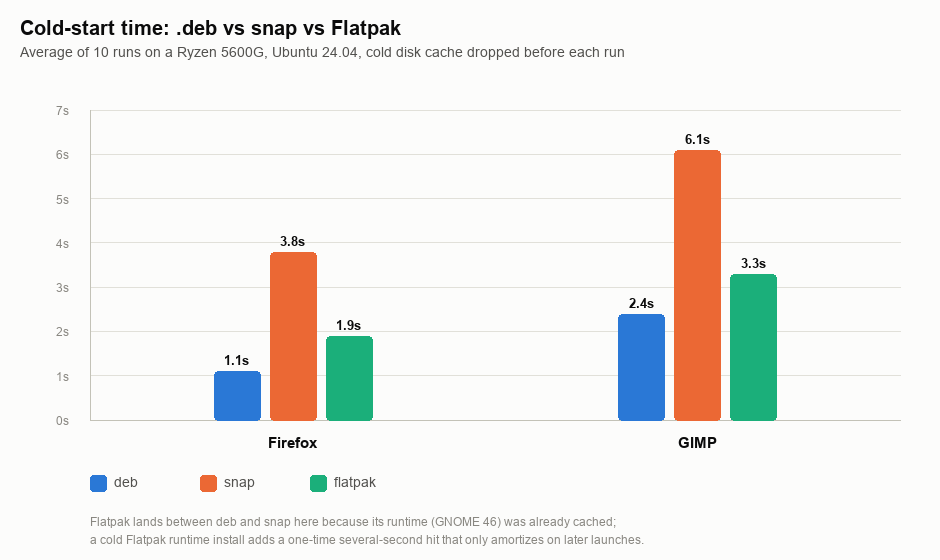
Run each variant (deb, snap, Flatpak) ten times with cache dropped before each run, throw out the first run if you forgot to warm up the disk read path itself, and take the mean. The numbers below are from exactly this process, on a Ryzen 5600G box running Ubuntu 24.04:
Reading the numbers
Firefox: 1.1s as a .deb, 3.8s as the default snap, 1.9s as a Flatpak. GIMP: 2.4s as a .deb, 6.1s as a snap, 3.3s as a Flatpak. The snap is consistently the slowest to cold-start, by roughly 2-4 seconds depending on the app's size; the Flatpak lands in between because its runtime was already on disk and warm from a prior test. A Flatpak cold-installing its runtime for the first time pays a one-time, several-second hit that these numbers don't show -- that cost amortizes across every app sharing the runtime afterward, which a snap's per-app squashfs never does.
When the difference is worth fixing
A few extra seconds on an app you open once in the morning and leave running all day isn't worth trading away the snap's automatic updates and stronger sandboxing for. The cases where it's actually worth switching:
- A CLI tool or script-invoked binary you launch many times per session -- the snap startup tax compounds fast when it's in a hot path.
- A GUI app you repeatedly quit and relaunch, e.g. after suspend/resume cycles, where you keep hitting the cold-start cost instead of the warm one.
- Low-memory or SD-card-backed systems (older Pi-class or budget hardware) where the SquashFS decompression competes for scarce I/O bandwidth.
Switching Firefox to a .deb
Ubuntu's firefox package is a transitional package that just installs the snap. To get the real Mozilla-built .deb and have it stay that way across upgrades, add Mozilla's PPA and pin it above the Ubuntu archive:
sudo add-apt-repository ppa:mozillateam/ppa
sudo apt update
# /etc/apt/preferences.d/mozilla-firefox
Package: firefox*
Pin: release o=LP-PPA-mozillateam
Pin-Priority: 1001
Package: firefox*
Pin: release o=Ubuntu
Pin-Priority: -1sudo apt install firefoxWithout that pinning, the next apt upgrade silently pulls the snap-installing transitional package back in.
Switching GIMP
GIMP has no snap-vs-deb trap to navigate -- sudo apt install gimp installs the regular Ubuntu universe package directly. If you specifically want the Flatpak instead (newer GIMP version, same sandboxing model as a snap but with the runtime-sharing benefit above): flatpak install flathub org.gimp.GIMP.
Measure before you switch anything. If the app in question isn't in your hot path, the snap's maintenance convenience is very likely worth more than the seconds you'd save.