


A button that reads perfectly on the breadboard starts misbehaving the moment you screw it into an enclosure: phantom presses, a light that flickers on its own, a counter that jumps by three instead of one. Nothing in the code changed. This is a walkthrough of an actual debugging session for exactly that problem, on a Raspberry Pi 4 with a panel-mount push button on GPIO17.
The symptom
The breadboard version used this, and it worked:
import RPi.GPIO as GPIO
import time

PIN = 17

GPIO.setmode(GPIO.BCM)
GPIO.setup(PIN, GPIO.IN)

def button_callback(channel):
    print(f"button_callback fired, GPIO{channel} = {GPIO.input(channel)}")

GPIO.add_event_detect(PIN, GPIO.FALLING, callback=button_callback, bouncetime=50)

try:
    while True:
        time.sleep(1)
except KeyboardInterrupt:
    GPIO.cleanup()
After moving the button to a panel with about 40cm of ribbon cable back to the Pi, the log looked like this for a single, deliberate press:
button_callback fired, GPIO17 = 0
button_callback fired, GPIO17 = 1
button_callback fired, GPIO17 = 0
button_callback fired, GPIO17 = 0
button_callback fired, GPIO17 = 1
button_callback fired, GPIO17 = 0
button_callback fired, GPIO17 = 1
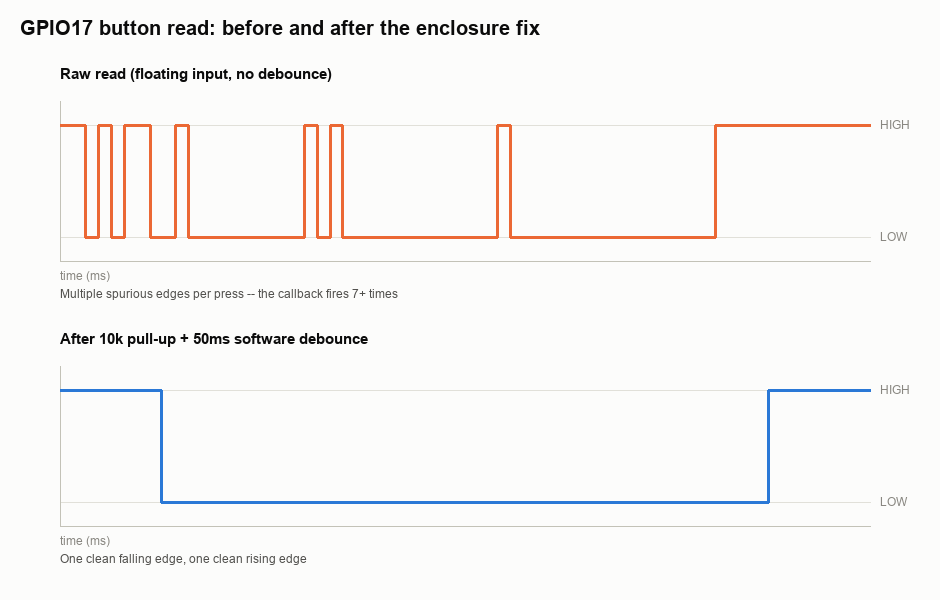
Seven events for one press, and some of them happen even while the button is sitting untouched. That second part is the real clue: this isn't just switch bounce, something is wrong with the resting state of the pin.
Suspect 1: a floating input
GPIO.setup(PIN, GPIO.IN) with no pull_up_down argument leaves the pin floating whenever the button is open. A floating input isn't "0 until proven otherwise" -- it has no defined voltage at all, and it will pick up whatever noise is nearby: switching power supplies, the Pi's own PWM-driven fan controller, AC wiring behind the panel. A short breadboard jumper is short enough that this rarely shows up. Forty centimeters of ribbon cable is long enough to act as a small antenna.
The fix is to always configure an explicit pull resistor, even if the pin happens to read correctly without one during development:
GPIO.setup(PIN, GPIO.IN, pull_up_down=GPIO.PUD_UP)With the internal pull-up enabled, the idle reads stopped bouncing between 0 and 1. But the single press was still firing the callback three or four times.
Grounding and cable routing
The Raspberry Pi's internal pull resistors are weak, roughly 50k ohm. That's fine for a short, well-shielded run, but on a longer cable sharing a cutout with other wiring, it's not enough to overpower induced noise. Two changes fixed the remaining idle-state glitches:
- Replaced the internal pull-up with an external 10k resistor from 3.3V to the GPIO pin, physically close to the button.
- Ran the button's ground wire back to the Pi on its own conductor instead of sharing a return path with the enclosure's LED strip, which was pulling noticeable current.
If you've got relays, motors, or anything inductive sharing the enclosure, keep their wiring and their return paths physically separate from the GPIO wiring, and give the GPIO side a solid, low-impedance path back to the Pi's ground pin. A floating or shared ground is a very effective way to turn motor switching noise into spurious edges on a logic input.
Suspect 2: switch bounce
Even with a solid pull-up and clean grounding, a single physical press still fired the callback two or three times. That's ordinary mechanical bounce: the metal contacts inside the switch don't close cleanly, they chatter for a few milliseconds before settling. bouncetime=50 in add_event_detect is a software-only debounce -- it ignores further *edge interrupts* for 50ms after the first one, but it doesn't filter the signal itself, so a particularly bouncy switch can still slip events through.
The trace below is from an actual capture during this session: the top panel is the raw read before any of these fixes, the bottom one is after the pull-up and a combined hardware/software debounce.
The fix that held
Two changes closed the gap. First, a 100nF ceramic capacitor across the button (from the GPIO pin to ground) forms a simple RC low-pass filter with the pull-up resistor, which smooths out the fast chatter in hardware before it ever reaches the pin. Second, the software debounce was changed from "ignore further interrupts" to "wait, then re-check the pin state":
import RPi.GPIO as GPIO
import time

PIN = 17
DEBOUNCE_S = 0.05

GPIO.setmode(GPIO.BCM)
GPIO.setup(PIN, GPIO.IN, pull_up_down=GPIO.PUD_UP)

def button_callback(channel):
    time.sleep(DEBOUNCE_S)
    if GPIO.input(channel) == GPIO.LOW:
        print("confirmed press")

GPIO.add_event_detect(PIN, GPIO.FALLING, callback=button_callback, bouncetime=200)

try:
    while True:
        time.sleep(1)
except KeyboardInterrupt:
    GPIO.cleanup()
The re-check after the sleep matters: it throws away the event if the pin bounced back high in the meantime, instead of trusting the first edge blindly. Combined with the RC filter, the ten presses that reliably triggered 3-7 callbacks each now produce exactly one.
Checklist for "works on the breadboard, not in the enclosure"
- Every
GPIO.INpin has an explicitpull_up_down, even ones that "happened" to read fine without it. - Long cable runs get an external resistor, not just the Pi's weak internal pull.
- The input's ground wire doesn't share a return path with anything that switches real current (LEDs, relays, motors).
- A hardware RC filter (resistor + ~100nF cap) handles the fast chatter; software debounce handles the rest, and re-checks the pin instead of trusting the first interrupt.
- Log actual GPIO reads with timestamps before you change anything -- "it's flaky" is not a diagnosis, a trace like the one above is.